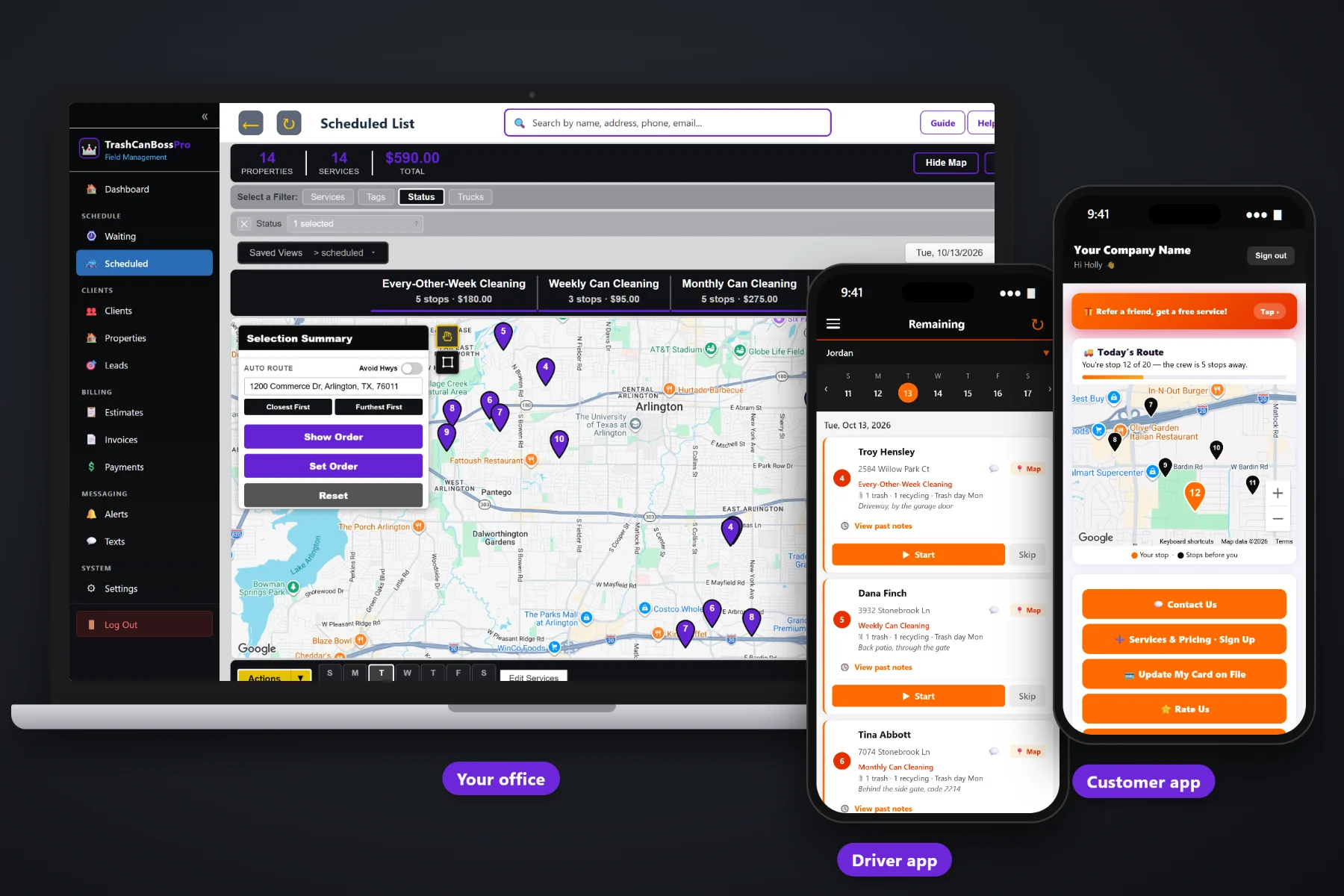
A bin cleaning route only works if the trailer shows up after the garbage truck and before the homeowner rolls the cans back up the driveway. TrashCanBossPro stores the city trash pickup day on every address, puts every cleaning that came due on the Waiting List map, and lets you build each day's route by neighborhood and trash day. Auto-route Closest First or Furthest First from the shop, split the city between trailers, text customers to leave their cans out, and watch the crew work the route on the office map.
Plans start at $59/month and you are never billed per user, so every trailer, every tech and the person running dispatch all get the software. Trash day on every address, the Waiting List map, auto-routing, the tech's phone in route order, customer texts and crew GPS are part of the platform, not an add-on. For the whole picture of sign-ups, plans, billing and the customer app, start at TrashCanBossPro, then come back here for the route side.
Each address carries its city pickup day and its can count, shown right under the address: "2 trash · 1 recycling · Trash day Tue."
Every cleaning that came due on a live map, pins colored not due yet, due now and overdue, so you can see which neighborhoods are ready.
Auto-route the day from the shop, Closest First or Furthest First, then adjust the order by hand where you know better.
Filter the dispatch board by trailer or truck so two rigs can split a city without crossing paths.
Automated night-before reminders plus on-the-way and arrived texts, so the cans are at the curb when the trailer pulls up.
The office sees the crew on the map, and customers see "You're stop 12 of 20" in their app.
An empty can at the curb is the easiest can you will ever clean. A full one is a skip, and one that is already back behind the gate is a walk. TrashCanBossPro keeps the trash pickup day on every address, so you can group Tuesday streets into a Tuesday route and send the trailer in behind the garbage truck.
You did not start a bin cleaning business to spend evenings on a map with a highlighter. TrashCanBossPro does the sorting: plans come due on their own, trash days are already on the addresses, and auto-route puts the stops in order. You check it, tweak it and send the crew out.
Import your customer list by CSV or add clients one at a time. Record the cans, the trash day and where the cans live.
Weekly, every-other-week and monthly plans land on the Waiting List map when their minimum days between visits have passed.
Pick the neighborhoods whose trash day is tomorrow, assign them to a trailer and auto-route from the shop.
Techs see the route in order on their phones. Customers get their reminder, their on-the-way text and their stop count.
Most scheduling tools think in appointments: a customer, a time slot, a tech. Bin cleaning does not work that way. The real appointment is set by the city garbage truck, and the software has to know which day that is for every address.
Ask anyone who has run a bin cleaning trailer and you will hear the same story: a spreadsheet of addresses, a paper route sheet sorted by hand, and a morning spent driving past houses where the cans were still full or already put away. Half the day goes to the drive, not the wash.
When the trash day lives on the address and the cleanings that came due are on one map, you can build a route that follows the garbage truck through one neighborhood at a time, and the trailer spends its day cleaning.
TrashCanBossPro keeps the address, the cans, the trash day, the plan and the customer in one place, from sign-up to the paid invoice.
Every tool here exists to put more clean cans in a day and less windshield time in the trailer.
Trash, recycling and yard waste counts plus the city pickup day on every address, shown on lists and the tech's phone.
Side of the garage, behind the gate, gate code. Under the address on every card.
Weekly, every-other-week and monthly cleanings set by minimum days between visits: 7, 14 or 28.
Pins colored not due yet, due now, and overdue past a 7-day grace, on a live map and list.
The dispatch board shows jobs by day, filtered by trailer or truck.
Closest First or Furthest First, then set the route order by hand where you need to.
Company login plus PIN, the day's stops in order, navigation, Start / Skip / Complete and photos.
Automated "we clean tomorrow" reminders by text and email, plus two-way texting from the office.
Sent automatically from the tech's phone as the route runs.
Crew locations show on the office map during the workday.
In the customer app: "You're stop 12 of 20, the crew is 5 stops away."
Complete creates the invoice and can charge the card on file.
One monthly statement for an HOA or property manager covering every address, each line labeled.
Bring your existing customer list in and start routing the same week.
Bill customers in their own currency wherever your trailers run.
Start $59, Pro $89, Crew $199 per month. Every trailer and tech included.
The day starts on the Waiting List, a live map of every cleaning that came due. Weekly, every-other-week and monthly plans show up on their own. The dispatcher picks the neighborhoods whose trash day matches, assigns them to a trailer and day, auto-routes from the shop and checks the order. The tech's phone shows the same list. As stops are completed, the office sees cans cleaned, photos attached and invoices created. For the full walkthrough, read Bin Cleaning Route Software: The Complete Guide to Building Routes Around Trash Day.
The biggest threat to a bin cleaning route is a can that went back up the driveway an hour too early. An automated reminder the night before tells the customer to leave the cans out after pickup. On the day, on-the-way and arrived texts go out from the tech's phone, and the customer app shows a live map of the route with their place in line. Replies come back to the office through two-way texting.
Pick the plan that fits your trailers. Every plan starts with a 14-day free trial and no credit card.
Compare plans on the pricing page.
You record the city trash pickup day on each address, along with the number of trash, recycling and yard waste cans and where the cans are kept. It shows under the address on the office lists and on the tech's phone, so you can group addresses by trash day when you build a route.
Each plan has a minimum number of days between visits: 7 for weekly, 14 for every-other-week and 28 for monthly. When that time has passed, the cleaning shows on the Waiting List map. Pins are colored not due yet, due now, and overdue once they pass a 7-day grace.
Yes. On the Scheduled List you can auto-route a day Closest First or Furthest First from your shop, then change the route order by hand. The tech's phone shows the same order.
Yes. Assign jobs to a trailer or truck and filter the board by trailer, so each rig has its own route. Employees log in to the tech app with your company login and their own PIN, and you are never billed per user.
You move the affected jobs to the new day on the board and send customers a text. Because the route is built from the trash day on each address, it is easy to see which stops need to shift.
Start is $59/month, Pro is $89/month, and Crew is $199/month. Every plan starts with a 14-day free trial with no credit card.
Routing is one piece of how TrashCanBossPro runs a bin cleaning company. For sign-ups, recurring plans, billing, HOA accounts and the customer app, see the full TrashCanBossPro platform overview.
Practical reading on building routes around trash pickup days, the Waiting List map, route order, splitting trailers, holiday weeks, missed cans, customer texts, crew GPS and growing a neighborhood until the route pays.
Trash day on every address, the Waiting List map, auto-routing from the shop, leave-your-cans-out texts and crew GPS. Try TrashCanBossPro free for 14 days.