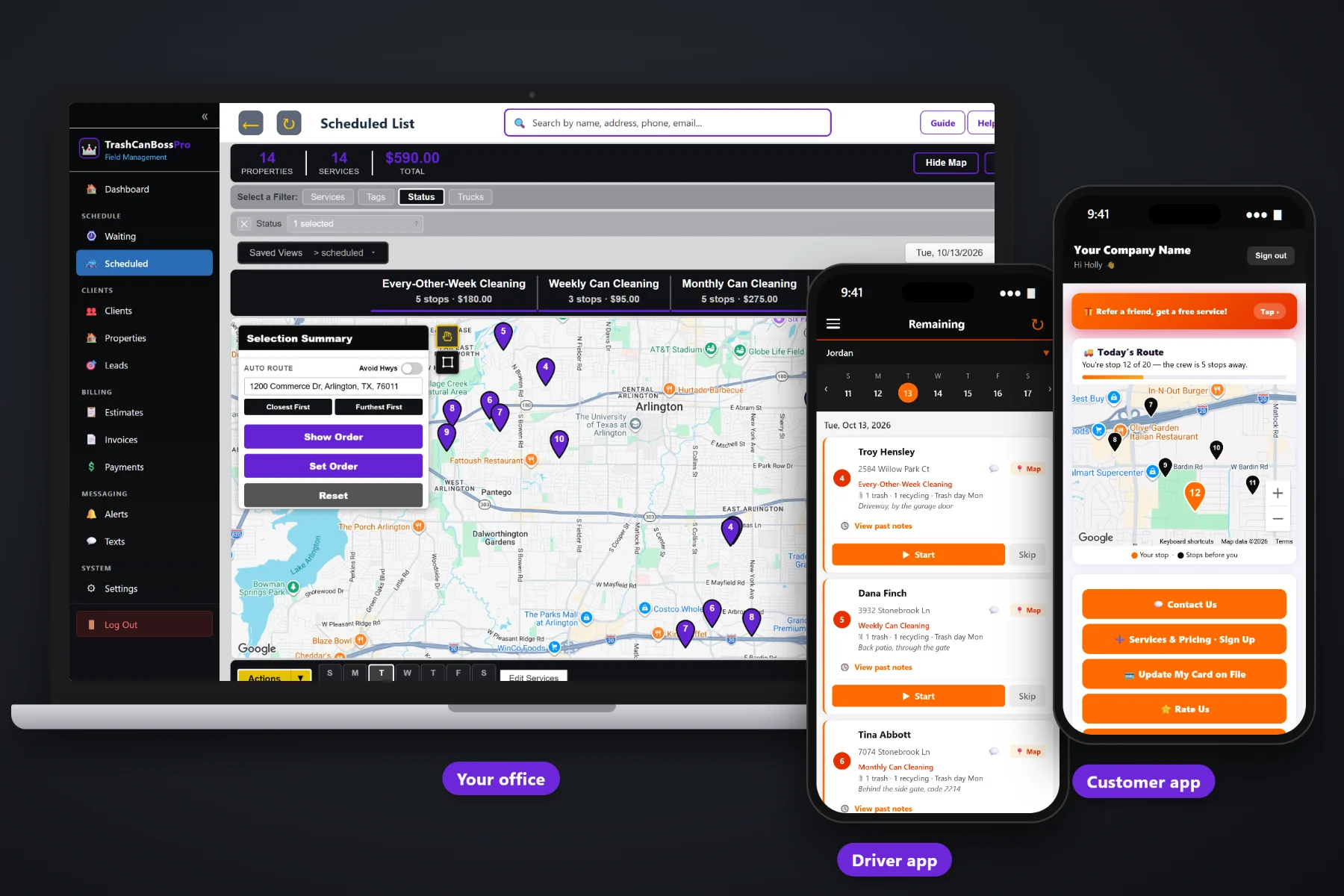
A bin cleaning business lives on repeat customers. TrashCanBossPro runs monthly, every-other-week and weekly cleaning plans from a minimum number of days between visits, so every address shows up on the Waiting List when it is due. Can counts and the city trash day sit on every address, reminder texts go out before each cleaning, and the card on file is charged when the tech taps Complete.
Plans start at $59/month and you are never billed per user. Recurring plans, the Waiting List, routing around trash day, reminder texts, the tech app and billing all come with the platform. To see how plans fit with sign-ups, routes and the customer app, start at TrashCanBossPro and then dig into recurring plans here.
Each plan is a minimum number of days between cleanings: 7, 14 or 28. Set it once on the address and it keeps coming back.
The Waiting List shows every cleaning that came due, colored not due yet, due now or overdue past a 7-day grace.
Trash, recycling and yard waste counts plus the city trash day, right under the address on every list and phone.
“We clean tomorrow, leave the cans out” goes out automatically, so fewer cans are back in the garage when the trailer pulls up.
Card on file, charged when the tech completes the job or on a schedule you set. No chasing $30 payments.
HOAs, property managers and businesses set to Monthly get one statement covering every address they own.
A recurring customer is more than a name and a monthly charge. It is an address with three cans, a Tuesday trash day, a gate on the left side of the garage and a plan that comes due every 28 days. TrashCanBossPro keeps all of it on the address, so the office, the tech and the invoice agree.
You did not start a bin cleaning business to keep a calendar of who is due when. TrashCanBossPro asks you to set each plan once. After that, cleanings come due on their own, reminders go out, and payment follows the tech's Complete button.
Import your customer list or add addresses by hand, with can counts, trash day and can location notes on each one.
Weekly is 7 days between visits, every-other-week is 14, monthly is 28. One-time deep cleans stay one-time.
Due cleanings land on the Waiting List map. Assign them to a trailer and day, built around the trash day.
The tech taps Complete, the invoice is created, the card on file can be charged, and the next cleaning clock starts.
Generic field-service software treats every visit as a one-off appointment. A bin cleaning subscription is a promise to show up again and again, right after the city empties the cans, for as long as the customer stays.
Most bin cleaning companies start with a spreadsheet: a row per customer, a column for the plan, a column for the last cleaning. It works for twenty customers. Somewhere past fifty, someone gets missed. A monthly customer goes six weeks without a cleaning, notices the smell before you notice the gap, and cancels.
The fix is not a better spreadsheet. It is a system where the plan itself decides when the next cleaning is due, and where an overdue address turns a different color instead of hiding in row 214.
TrashCanBossPro keeps the plan, the cans, the trash day and the card on file together, from the first sign-up to the hundredth cleaning.
Everything here exists to keep subscribers cleaned on time, billed on time and happy enough to stay.
Weekly (7), every-other-week (14) and monthly (28). Change the number and the plan changes with it.
Every due cleaning on a live map and list, colored not due yet, due now, or overdue past a 7-day grace.
Trash, recycling and yard waste cans on every address, shown as "2 trash · 1 recycling · Trash day Tue".
Build routes around the city pickup day so cans are cleaned right after they are emptied.
First cleans and one-off jobs sit alongside plans, so a one-time customer is one step from a subscription.
Pad cleaning, deodorizing and extra cans as line items from your own service list.
Automated "we clean tomorrow, leave the cans out" reminders, plus night-before, next-stop and arrived alerts.
Card on file charged on completion or on a schedule. Past-due follow-up for the ones that fail.
One statement a month for an HOA, property manager or business, each line labeled with the address.
Monthly, Every-Other-Week, HOA, Commercial or your own, for filtering lists and reports.
A sign-up form on your website captures the card and lands in Form Responses. One click makes it a client.
Subscribers see the live route, update their card, pay invoices, request service and refer neighbors.
See your active recurring customers, revenue and who is overdue, without counting rows by hand.
Bring your existing subscriber list in from a spreadsheet instead of retyping it.
Works in the US, Canada, Australia, New Zealand and the UK, billing customers in their own currency.
Start $59, Pro $89 and Crew $199 per month. Every tech and office user included.
When a cleaning is completed, the plan starts counting. Once the minimum days between visits have passed, the address appears on the Waiting List as due now. If it sits past a 7-day grace, it turns overdue. The office assigns due cleanings to a trailer and day, routes them Closest First or Furthest First from the shop, and the tech's phone shows the same order. For the whole picture of running subscriptions, read Trash Can Cleaning Subscription Plans: The Complete Guide to Recurring Bin Cleaning Revenue.
A recurring customer stays when the service feels dependable. The night before, they get a reminder to leave the cans out. On the day, they can watch the route in the customer app and see how many stops away the crew is. When the cleaning is done, the invoice is there and the card on file is already charged. If they want to add a recycling can or book a one-time pad cleaning, they can request it from the app.
Pick the plan that fits your operation. Every plan starts with a 14-day free trial and no credit card.
Compare plans on the pricing page.
Each recurring service has a minimum number of days between visits: 7 for weekly, 14 for every-other-week and 28 for monthly. After a cleaning is completed, the address comes due again on the Waiting List once that many days have passed.
Pins and rows are colored by status: not due yet, due now, and overdue once a due cleaning has sat past a 7-day grace. The office can see at a glance which subscribers need to be routed first.
Yes. One-time cleanings are scheduled like any other job and do not come back on their own. When a one-time customer wants a plan, add the recurring service to their address and it starts coming due.
With a card on file. You can charge it automatically when the tech completes each cleaning or on a schedule. HOAs, property managers and businesses set to Monthly get one statement covering all their addresses.
Yes. Automated reminders like "we clean tomorrow, leave the cans out" go out by text and email, and customers can choose night-before, when-they're-next and tech-arrived alerts.
Start is $59/month, Pro is $89/month, and Crew is $199/month. You are never billed per user, and every plan starts with a 14-day free trial with no credit card.
Recurring plans are one piece of how TrashCanBossPro runs a bin cleaning company. For routes, the tech app, sign-ups, the customer app and billing, see the full TrashCanBossPro platform overview.
Practical reading on monthly, every-other-week and weekly plans, the Waiting List, pricing by can count, add-ons, seasonal frequency, auto-charge, monthly account billing, skips, cancellations, win-backs and retention.
Plans that come due on their own, reminders before every cleaning, can counts and trash day on every address, and a card charged each time the tech taps Complete. Try TrashCanBossPro free for 14 days.